
Digital materials are wanted to be received in many different ways. Most often, materials are imported by users logged in to the service. Increasingly, the right to import materials is also wanted to be given to users who do not have access to the service itself. Importing materials is possible in EMMi using the public upload form ( = PUF).
Note! The upload form is a paid feature. If you want to hear more, please contact your EMMi contact person or send an email to support:
helpdesk@emmi.fi
Creating a form
Upload forms are created and edited by the data bank’s admininistrtors users.
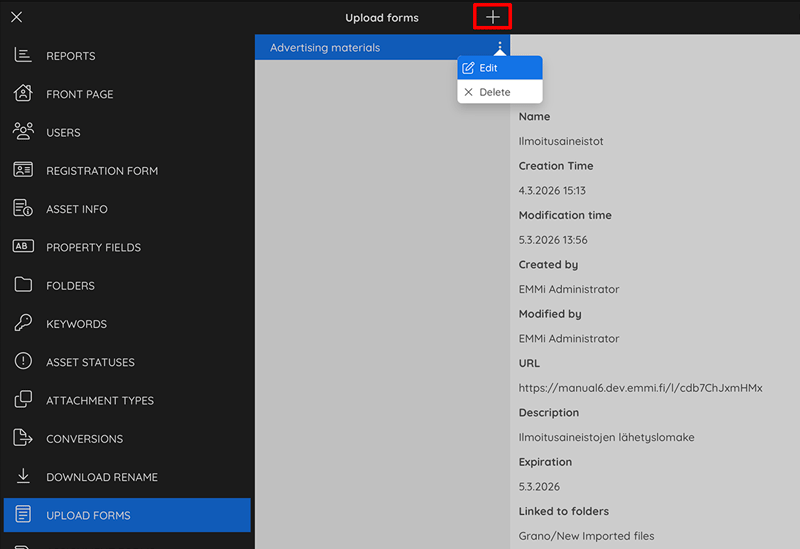
Select the “Upload forms” selection and click the “+” button to create a new form.
Form Details
![]()
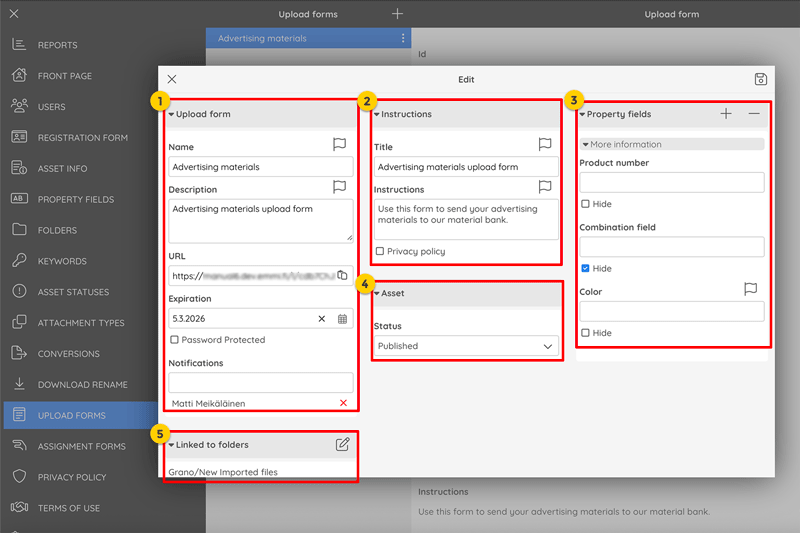
- Basic form information, such as the name and description, the URL where the form can be found, the validity period (which can also be unlimited), password protection, and the email address where notifications regarding the form’s use will be sent.
- Information displayed on the form, such as the title and instructions for the sender. As an optional feature, you can also enable a privacy statement to be displayed on the form.
- As an optional feature, you can add various metadata fields to the form that you want the sender to fill out. These fields can be required or optional.
- You can set the desired default status for files received through the form.
- Files received via the form can be saved to one or more directories in the data bank.
Feedback
Copyright © 2026 Grano
—
Powered by 
Post your comment on this topic.